
What app can I use to check on my elderly parents?
It depends what you want to know. Location-sharing apps tell you where someone is; alarm and sensor apps tell you something has happened; check-in apps and call services tell you how someone is doing. Many parents don't want or can't use a smartphone app, so services that work over an ordinary phone call are often the easiest to say yes to.
Why is this harder than it sounds?
App stores are full of "senior safety" apps, and it's hard to tell them apart. Many assume your parent will carry a charged smartphone, keep location on and open the app daily, which isn't how a lot of older people use their phones. The other trap is consent: an app that quietly tracks a parent who hasn't agreed can damage trust badly if they find out.
The main types of app
- Location sharing (built into most phones): good for "did they get home?", but needs the phone with them and switched on.
- Alarm and fall-detection apps or watches: designed for emergencies; check whether alerts go to family or a 24-hour service.
- Smart home and sensor apps: alert family to things like no movement in the morning, or a door left open.
- Check-in apps: your parent taps "I'm OK" each day, and family are told if they don't.
- Check-in call services: a call to your parent's ordinary phone, by a person or an automated or AI caller, with a summary sent to you.
- Shared family apps: rotas, notes and updates so siblings stay in step.
What to ask before you choose
Whatever you pick, check:
- Has your parent agreed, and do they know what you'll see?
- Does it need a smartphone, an app or a wearable on their side?
- What exactly are you told, and when?
- Is anything recorded, and who can see it?
- How does your parent stop it?
- What happens in an emergency? (Most check-in apps aren't emergency services.)
What should you do?
Decide what you need to know
Where they are, that they're safe, or how they're doing. One app rarely does all three well.
Match it to how your parent uses a phone
If they barely use apps, choose something that works by phone call or needs nothing from them.
Ask them
Show them what it does and what you'd see. Let them say no.
Try it for a few weeks
Then ask how it feels for both of you. Drop it if it's causing friction.
Keep an emergency plan
Know who has a key and how your parent gets help fast. The NHS describes personal alarms and key safes for this.
What tends not to work
Tracking a parent's location without telling them.
Choosing an app your parent has to remember to open every day.
Relying on an app for emergencies it isn't designed to handle.
Common questions
Do I need my parent's permission to use a check-on-parents app?
You should have it. Nura won't call anyone until they've agreed, by tapping Yes on a link or by you confirming they're happy to be called.
Is there an app for elderly parents without a smartphone?
Yes. Check-in call services work over an ordinary phone, and alarms can be a pendant or a button at home.
Where Nura fits
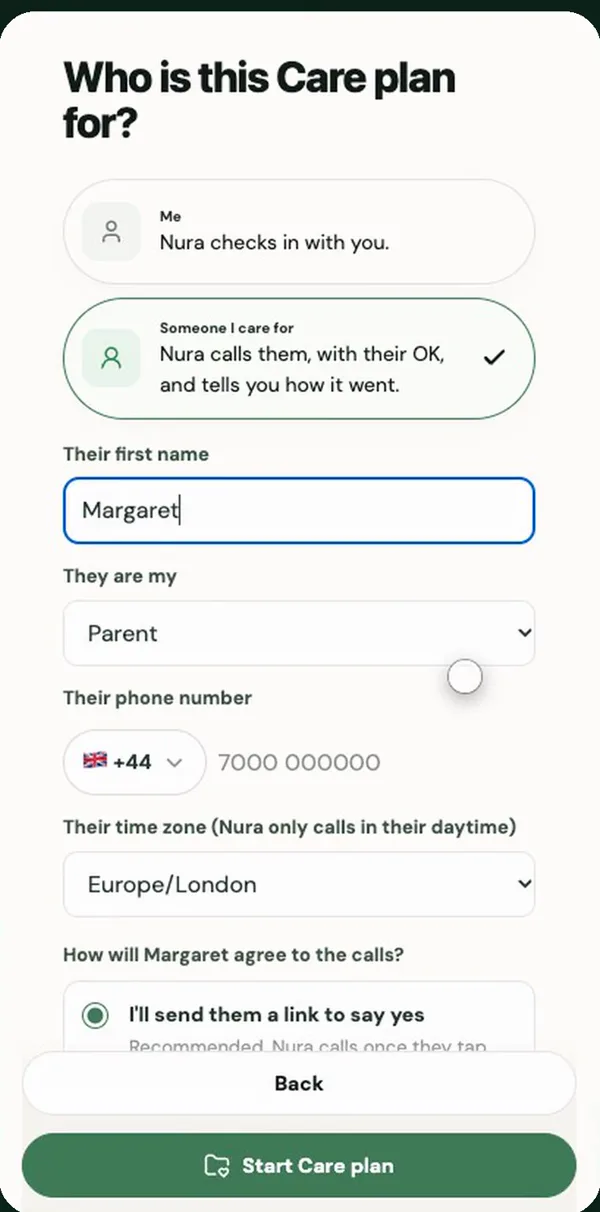
Nura is the check-in call kind. You use the app; your parent doesn't need one, or a smartphone. You add their first name and number, send them a link, and once they tap Yes, Nura calls their ordinary phone in their daytime, asks how things are going and sends you a short summary. You can invite siblings to the same Care plan. Calls to someone you care for are part of Nura Plus, which is US$9.99 a month after a 14-day free trial (prices may vary by region).
Sources
General information, not medical advice. Nura does not diagnose, prescribe or replace your clinician. In an emergency call 999 (UK) or 911 (US); in the UK, NHS 111 can help if you need medical help but it isn't an emergency.